
Unlock hidden Microsoft Teams features and empower your productivity.
- Real-Time Noise Suppression
- Live Transcription & Captions
- Together Mode
- Breakout Rooms
- Instant Polls and Surveys
- Whiteboard Enhancements
- Custom Meeting Backgrounds
- Tasks App Integration
- Microsoft Copilot
- Teams Premium Features
- Additional Enhancements
1. Real-Time Noise Suppression
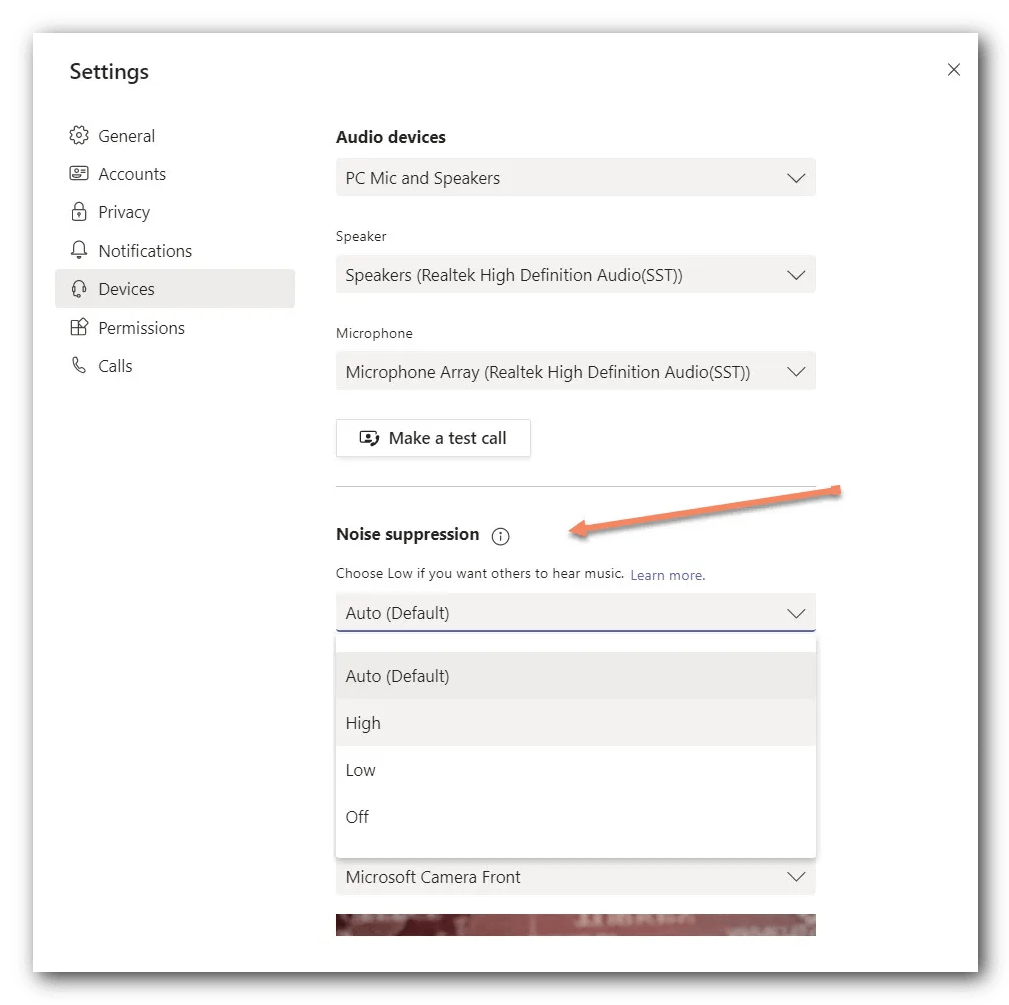
What it Does: Filters out distracting background noises, such as keyboard clicks, barking dogs, or construction sounds during calls.
Why You Need It: Ensures meetings are professional and distraction-free, making communication clearer and more productive.
- Self-Enable: Go to Settings > Devices > Noise Suppression and select Low, High, or Auto.
- Ask IT: Request organization-wide enforcement of high noise suppression settings. To get started, the tenant admin just needs to turn on the Allow Transcription policy. Then the meeting organizer or a presenter can start transcription
2. Live Transcription & Captions
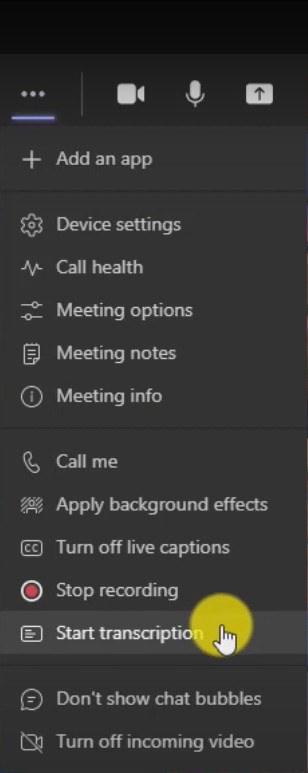
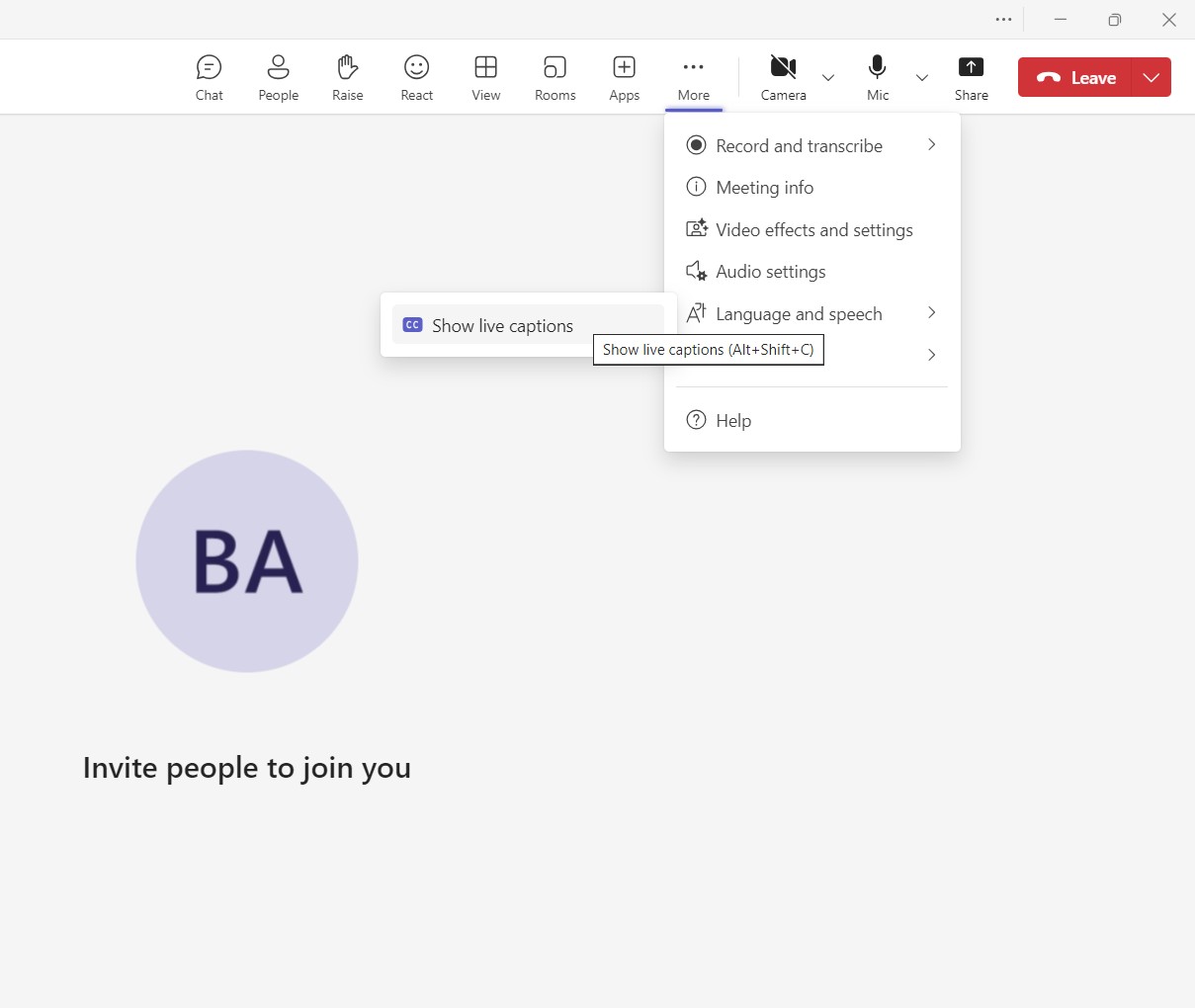
What it Does: Converts spoken words into real-time text during meetings, ensuring no key details are missed.
Why You Need It: Perfect for accessibility, minute-taking, or catching up on conversations.
- Self-Enable: Activate via More Actions > Turn on Live Captions or Start Transcription during a meeting.
- Ask IT: Ensure transcription is enabled across the organization.
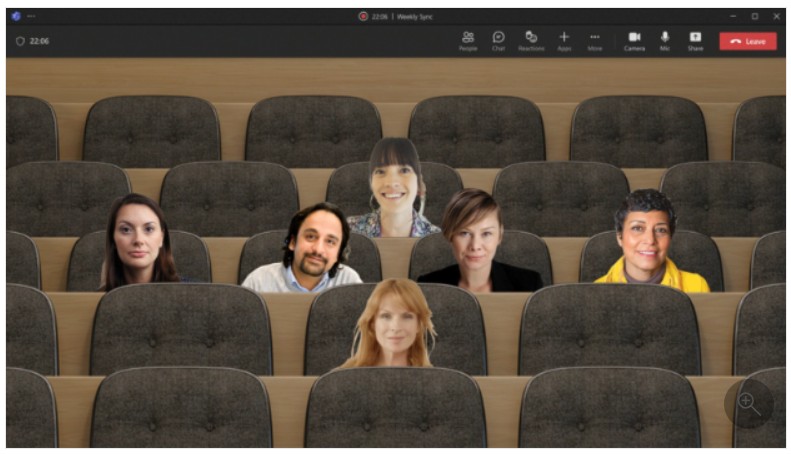
3. Together Mode
What it Does: Displays all participants in a shared virtual background, creating a more connected and engaging meeting experience.
Why You Need It: Together Mode fosters team connection and makes virtual meetings more enjoyable for remote teams.
- Self-Enable: Choose View > Together Mode during a meeting.
- Ask IT: Enable custom Together Mode themes with company branding.
4. Breakout Rooms
What it Does: Splits larger meetings into smaller groups for focused discussions or brainstorming.
Why You Need It: Ideal for workshops, training sessions, and strategy discussions.
- Self-Enable: Open the Breakout Rooms option during a meeting.
- Ask IT: Ensure the feature is enabled for your organization.
5. Instant Polls and Surveys
What it Does: Allows real-time feedback collection during meetings.
Why You Need It: Makes meetings interactive, enables quick decision-making, and gathers insights.
- Self-Enable: Add the Polls app during a meeting or channel.
- Ask IT: Ensure Polls is enabled in the Admin Center.
6. Whiteboard Enhancements
What it Does: Provides a collaborative canvas for brainstorming, complete with templates, sticky notes, and sketching tools.
Why You Need It: Streamlines collaborative brainstorming and keeps everyone aligned.
- Self-Enable: Access Whiteboard via the meeting toolbar.
- Ask IT: Enable AI-powered features in Whiteboard.
7. Custom Meeting Backgrounds
What it Does: Replaces your video background with professional images or branding, ensuring polished video calls.
Why You Need It: Ensures professionalism and minimizes distractions during meetings.
- Self-Enable: Choose Background Effects during a meeting.
- Ask IT: Upload branded backgrounds for your team.
8. Tasks App Integration
What it Does: Integrates Microsoft To Do and Planner for centralized task management within Teams.
Why You Need It: Centralizing task tracking ensures no deadlines are missed.
- Self-Enable: Open the Tasks app from the app bar.
- Ask IT: Ensure organization-wide integration is active.
9. Microsoft Copilot
What it Does: An AI-powered assistant that summarizes meetings, suggests follow-ups, and automates repetitive tasks.
Why You Need It: Boosts productivity by handling administrative tasks, letting you focus on strategic work.
- Ask IT: Activate Copilot or request a Teams Premium trial.
10. Teams Premium Features
What it Does: Unlocks advanced tools like AI meeting summaries, analytics, and enhanced security.
Why You Need It: Scales productivity and ensures better collaboration.
- Ask IT: Request Teams Premium or explore a trial.
Additional Enhancements
Licensing Costs Overview
| Feature | License Required | Approximate Cost |
|---|---|---|
| Real-Time Noise Suppression | Included in all Teams plans | Free |
| Live Transcription & Captions | Microsoft 365 Business Standard | $12.50/user/month |
| Microsoft Copilot | Teams Premium | $10/user/month (add-on) |
Troubleshooting Tips
- Live Transcription isn’t available: Ensure your organization has the right license or transcription is enabled by IT.
- Noise Suppression isn’t working: Check hardware compatibility or software updates.
Power User Tips
- Power Automate: Integrate Tasks App with Power Automate to trigger automatic workflows.
- Whiteboard + Copilot: Combine Copilot with Whiteboard for AI-driven brainstorming summaries.
Integration Highlights
- Power BI: Integrate live dashboards into Teams meetings.
- Third-party apps: Easily connect tools like Trello, Salesforce, and Zoom.
Official Documentation
Share this blog with your IT team today, and start making Microsoft Teams work smarter for your business!